> ## Documentation Index
> Fetch the complete documentation index at: https://docs.dialai.ca/llms.txt
> Use this file to discover all available pages before exploring further.
# Issues
> Track bugs, requested flow changes, and observations, and turn review findings into applied fixes
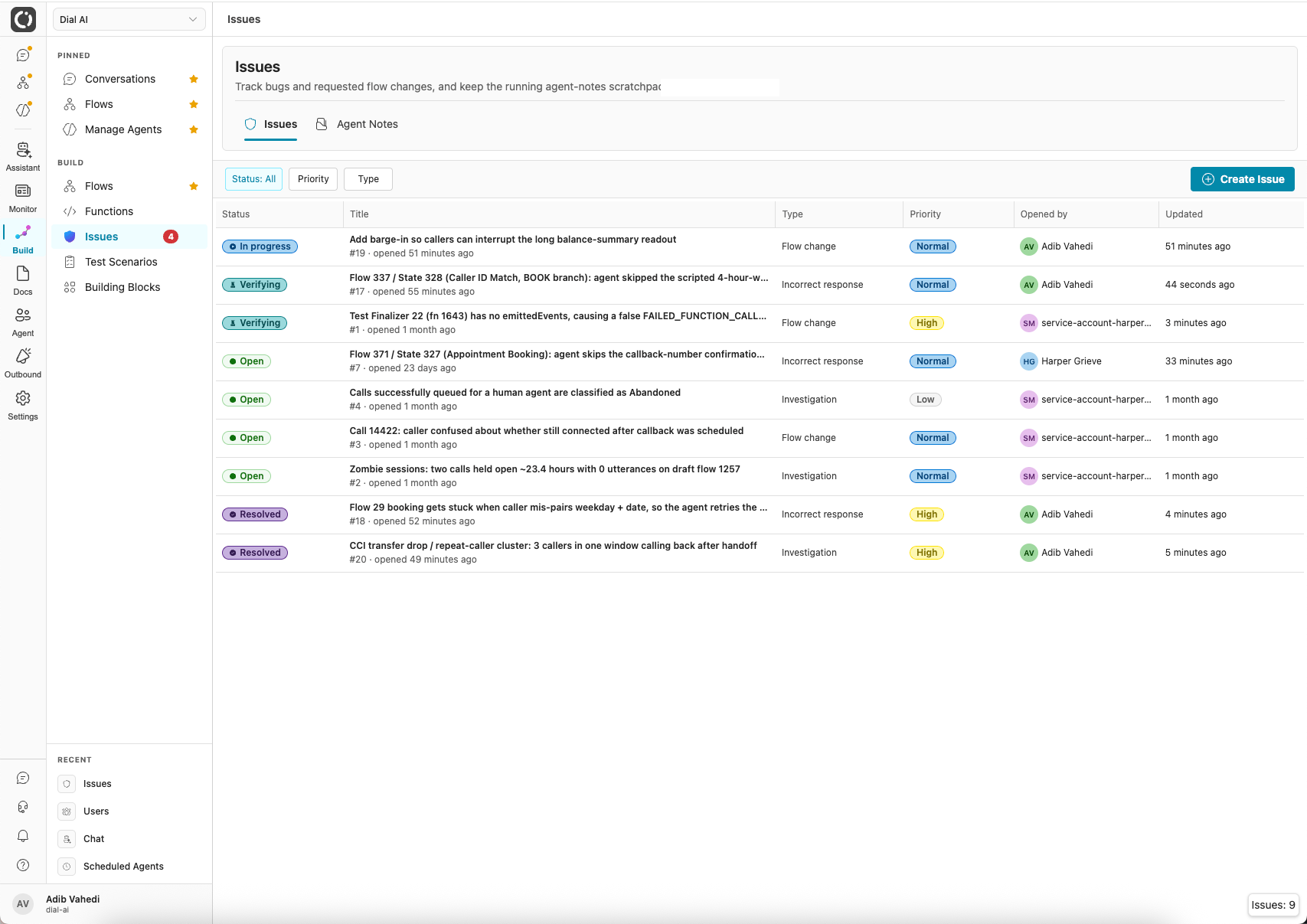 **Issues** are your tenant's tracked work items: an incorrect response caught during call review, a requested flow change, an investigation to run, or an observation worth recording. Each issue carries a status, a priority, a comment thread, and attachments, so findings survive across runs and hand off cleanly between people and agents.
The page has a second tab, **Agent Notes**: a shared scratchpad of durable context (patterns noticed, decisions made, fixes applied, things deliberately ignored). A note is reference memory with no action attached; an issue is a work item someone should act on.
## Accessing Issues
Navigate to **Issues** in the left sidebar.
## What's on the page
The issues table shows every issue in the tenant.
| Column | What it shows |
| ------------- | --------------------------------------------------------------- |
| **Status** | Where the issue is in its lifecycle (see below). |
| **Title** | Summary line, plus the issue number and age. |
| **Type** | Flow change / Incorrect response / Observation / Investigation. |
| **Priority** | Low / Normal / High / Urgent. |
| **Opened by** | The person, or agent, that filed it. |
| **Updated** | Last activity. |
Filter by status, priority, or type using the controls above the table, and click **Create Issue** to file one manually.
## Inside an issue
Click any row to open the issue. The left column holds the **description** and a running **activity** feed: every status change and comment, oldest first. The right rail is where you work the issue:
**Issues** are your tenant's tracked work items: an incorrect response caught during call review, a requested flow change, an investigation to run, or an observation worth recording. Each issue carries a status, a priority, a comment thread, and attachments, so findings survive across runs and hand off cleanly between people and agents.
The page has a second tab, **Agent Notes**: a shared scratchpad of durable context (patterns noticed, decisions made, fixes applied, things deliberately ignored). A note is reference memory with no action attached; an issue is a work item someone should act on.
## Accessing Issues
Navigate to **Issues** in the left sidebar.
## What's on the page
The issues table shows every issue in the tenant.
| Column | What it shows |
| ------------- | --------------------------------------------------------------- |
| **Status** | Where the issue is in its lifecycle (see below). |
| **Title** | Summary line, plus the issue number and age. |
| **Type** | Flow change / Incorrect response / Observation / Investigation. |
| **Priority** | Low / Normal / High / Urgent. |
| **Opened by** | The person, or agent, that filed it. |
| **Updated** | Last activity. |
Filter by status, priority, or type using the controls above the table, and click **Create Issue** to file one manually.
## Inside an issue
Click any row to open the issue. The left column holds the **description** and a running **activity** feed: every status change and comment, oldest first. The right rail is where you work the issue:
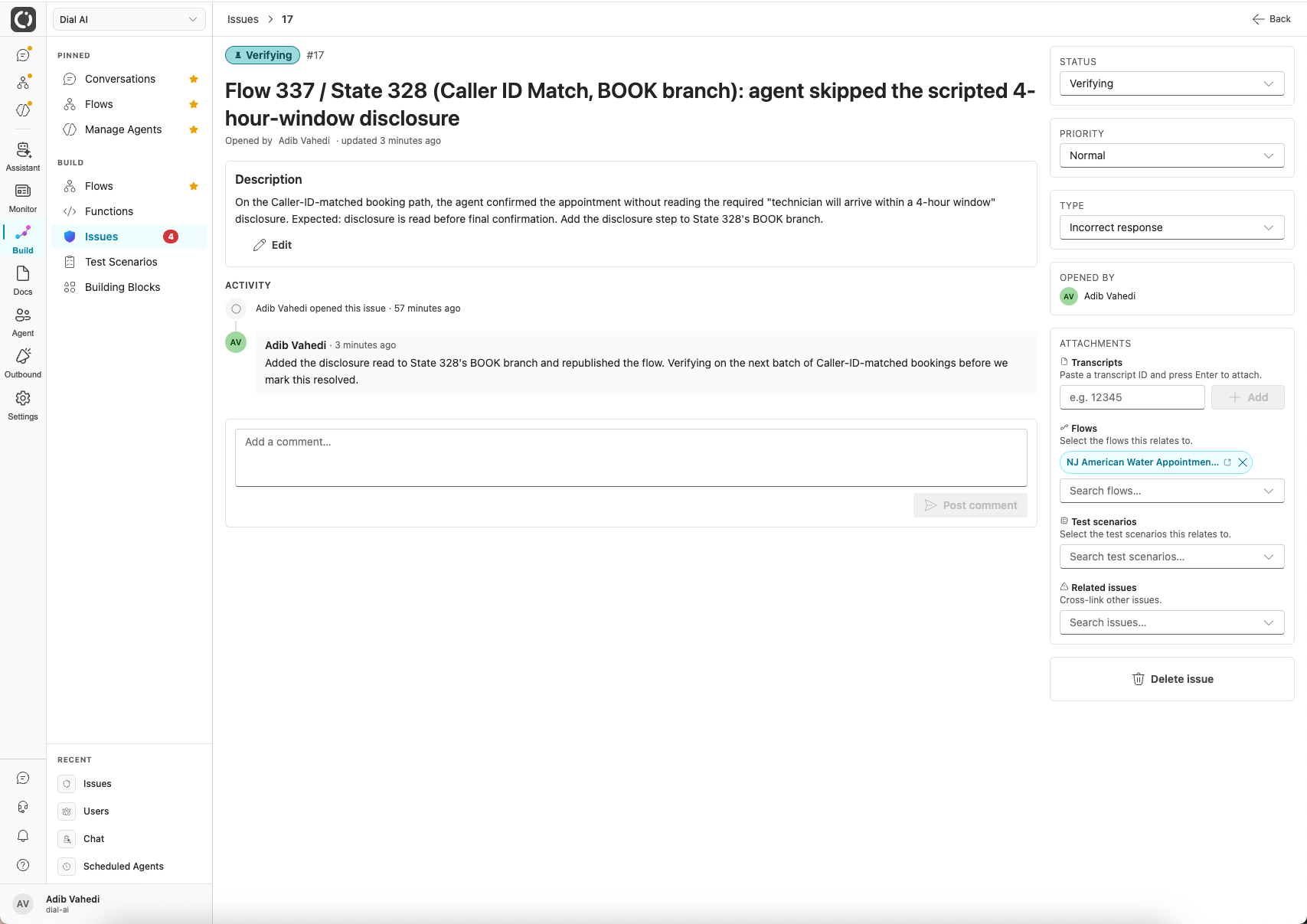 * **Status / Priority / Type**: change any of them inline from the dropdowns.
* **Attachments**: link the issue to the things it's about: paste a **transcript** ID, or search for a **flow**, **test scenario**, or **related issue**. A reviewer can then jump straight from the issue to the exact call, flow, or test it concerns.
* **Comment**: add context to the thread; each comment is stamped with who wrote it and when.
## Issue lifecycle
| Status | Meaning |
| --------------- | ------------------------------------------------------------------------------------------------------------------ |
| **Open** | Filed, not yet picked up. |
| **In progress** | Someone is actively working it. |
| **Verifying** | A fix has been applied and is being checked, and issues move here automatically when a proposed change is applied. |
| **Resolved** | Fix confirmed. |
| **Closed** | Done, no further action. |
| **Won't fix** | Deliberately not acting; the reasoning lives in the comments. |
## Comments and attachments
Every issue has a flat comment thread for discussion. Issues can also attach to the things they're about: transcripts, flows, test scenarios, and other issues. A reviewer can jump straight from "the agent said the wrong thing" to the exact call where it happened.
## Who files issues
* **Your team**, via **Create Issue**.
* **The review agent**, when call review flags a conversation that needs a fix rather than just a flag.
* **Internal agents**, which can open and update issues as they work so their findings are handed off with root-cause summaries and reproducible steps.
## Proposed changes: closing the loop
The most important thing attached to an issue is a **proposed change**: a structured fix proposal, distinct from the free-text comments. It carries the root cause, the precise change, an acceptance test, and risk/rollback notes.
The most common author is the review agent: when a flow accrues review corrections, they're distilled into a suggested call-review-guidance update and filed as a proposed change on a flow-targeted issue.
A proposal moves through its own statuses: **proposed**, then **approved / needs changes / rejected**, and finally **applied** or **superseded**.
### Approve & apply
Reviewing a proposal is one click: **Approve & apply** writes the suggested guidance to the flow and marks the proposal applied, which moves the parent issue to **Verifying**. Review findings become applied flow improvements in minutes, with the issue trail as the audit record.
Applying a proposed change is always a human action. Agents can prepare and file proposals, but never apply them.
## Agent Notes
The second tab holds the shared scratchpad. Notes work like issues without a lifecycle: create them, attach them to transcripts or flows, and search them later. Use notes for context you'd want the next person (or agent) to know; use issues for work that must get done.
***
## Related
Where review flags surface on individual calls.
Verify a fix with test scenarios before resolving.
Where applied guidance changes land.
* **Status / Priority / Type**: change any of them inline from the dropdowns.
* **Attachments**: link the issue to the things it's about: paste a **transcript** ID, or search for a **flow**, **test scenario**, or **related issue**. A reviewer can then jump straight from the issue to the exact call, flow, or test it concerns.
* **Comment**: add context to the thread; each comment is stamped with who wrote it and when.
## Issue lifecycle
| Status | Meaning |
| --------------- | ------------------------------------------------------------------------------------------------------------------ |
| **Open** | Filed, not yet picked up. |
| **In progress** | Someone is actively working it. |
| **Verifying** | A fix has been applied and is being checked, and issues move here automatically when a proposed change is applied. |
| **Resolved** | Fix confirmed. |
| **Closed** | Done, no further action. |
| **Won't fix** | Deliberately not acting; the reasoning lives in the comments. |
## Comments and attachments
Every issue has a flat comment thread for discussion. Issues can also attach to the things they're about: transcripts, flows, test scenarios, and other issues. A reviewer can jump straight from "the agent said the wrong thing" to the exact call where it happened.
## Who files issues
* **Your team**, via **Create Issue**.
* **The review agent**, when call review flags a conversation that needs a fix rather than just a flag.
* **Internal agents**, which can open and update issues as they work so their findings are handed off with root-cause summaries and reproducible steps.
## Proposed changes: closing the loop
The most important thing attached to an issue is a **proposed change**: a structured fix proposal, distinct from the free-text comments. It carries the root cause, the precise change, an acceptance test, and risk/rollback notes.
The most common author is the review agent: when a flow accrues review corrections, they're distilled into a suggested call-review-guidance update and filed as a proposed change on a flow-targeted issue.
A proposal moves through its own statuses: **proposed**, then **approved / needs changes / rejected**, and finally **applied** or **superseded**.
### Approve & apply
Reviewing a proposal is one click: **Approve & apply** writes the suggested guidance to the flow and marks the proposal applied, which moves the parent issue to **Verifying**. Review findings become applied flow improvements in minutes, with the issue trail as the audit record.
Applying a proposed change is always a human action. Agents can prepare and file proposals, but never apply them.
## Agent Notes
The second tab holds the shared scratchpad. Notes work like issues without a lifecycle: create them, attach them to transcripts or flows, and search them later. Use notes for context you'd want the next person (or agent) to know; use issues for work that must get done.
***
## Related
Where review flags surface on individual calls.
Verify a fix with test scenarios before resolving.
Where applied guidance changes land.